Our AI CRM Assistant helps sales teams access, create, and update CRM records instantly through natural-language conversations in Microsoft Teams. We connect CRM Buddy directly to your CRM, improving productivity, accelerating response times, and simplifying everyday sales operations.
CRM Buddy is a conversational sales assistant developed by ERBrains, part of its family of intelligent Microsoft 365 productivity tools. It connects directly to your CRM system and lets your team look up, create, and update customer records simply by chatting - no forms, no manual navigation, and no switching between applications.
It is built using Microsoft Copilot Studio and deployed as a bot inside Microsoft Teams, so your sales team can access CRM information from the same place they already collaborate, message, and hold meetings.
The most important thing to know about CRM Buddy: it is not tied to a single CRM vendor. It is designed with a flexible connection layer, meaning it can be configured to work with Microsoft Dynamics 365, Salesforce, HubSpot, Zoho, or virtually any other CRM platform your organization uses.
At its core, CRM Buddy performs four essential actions against your CRM data, all through natural conversation.
| Capability | What CRM Buddy Does |
|---|---|
| Connect | Links securely to your CRM platform of choice - Microsoft Dynamics 365, Salesforce, HubSpot, Zoho, or any other CRM with an available connector. |
| Read | Retrieves live records such as leads, contacts, opportunities, and account details on request, right inside the conversation. |
| Create | Adds new leads, contacts, tasks, or opportunities to the CRM directly from a chat instruction, with no need to open the CRM itself. |
| Update & Retrieve | Fetches and refreshes records, pulls reports, and summarizes account history on demand. |
CRM Buddy delivers premium performance through built-in flexibility and native integrations.
Connects to the CRM platform your business already uses today, and can be re-pointed to a different CRM later without rebuilding the assistant from scratch.
Runs as a bot directly inside Teams; no separate login, browser tab, or app installation required.
Uses Microsoft's low-code conversational AI platform, which brings enterprise-grade reliability, governance, and easy maintenance.
Team members ask questions or give instructions in plain English (e.g., "create a new lead for Contoso Ltd") instead of learning a query language or menu structure.
Respects the same permissions and data access rules already configured in Microsoft 365 and the connected CRM.
Every lookup reflects the live state of the CRM; there is no separate copy of the data to keep in sync.
Additional actions (quotes, reports, reminders, approvals) can be added over time as your process evolves.
Because ERBrains built CRM Buddy on a configurable connection layer, it is not limited to a single Dynamics 365 organization or setup. It can be pointed at any Dynamics 365 CRM environment - production, sandbox, or trial - regardless of tenant, region, or how heavily that environment has been customized, and it will read entities, fields, and records directly from that environment's live data.
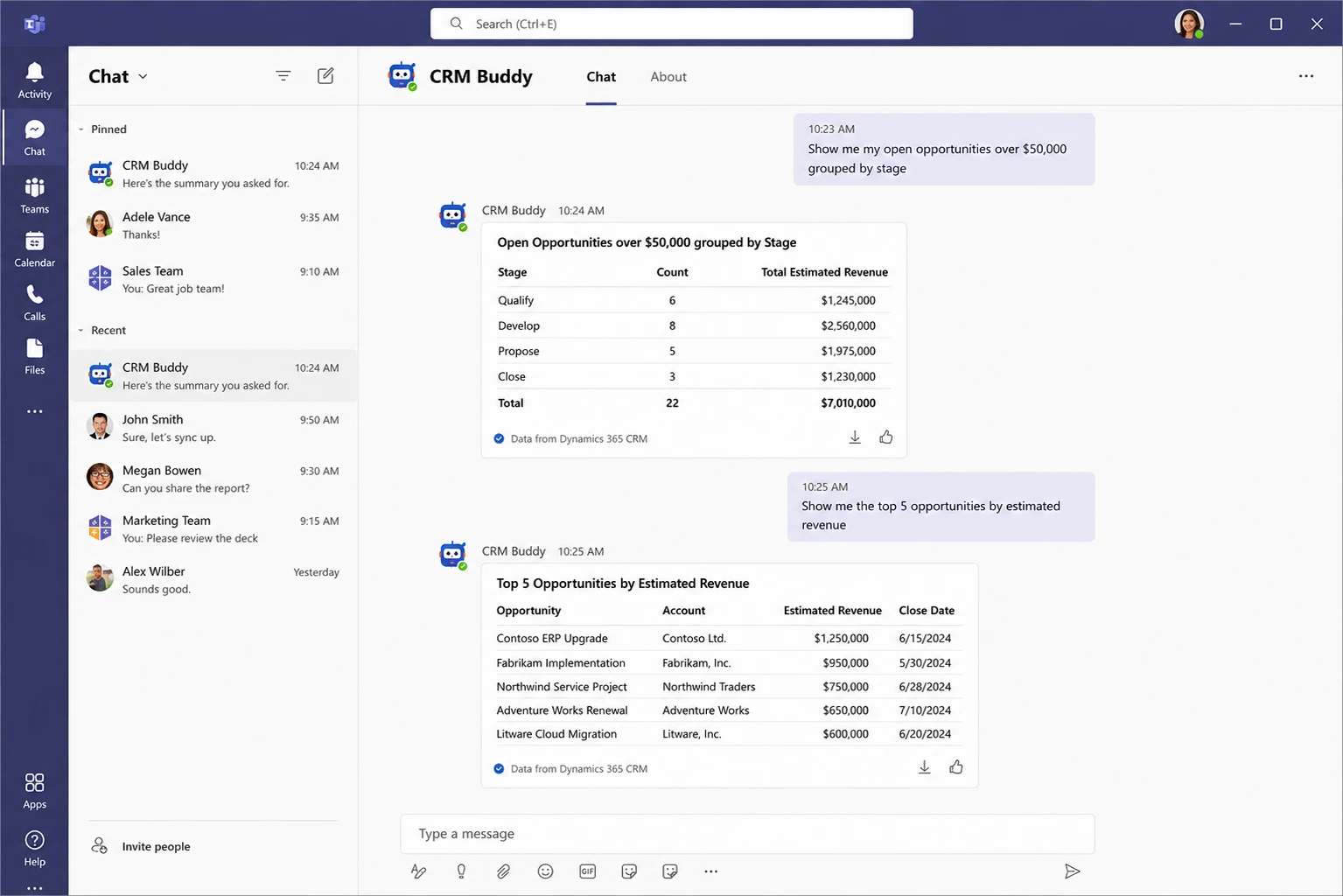
CRM Buddy sits between your sales team in Microsoft Teams and your CRM platform, translating everyday conversation into secure CRM actions.
A team member sends a message to CRM Buddy in Microsoft Teams.
Copilot Studio interprets the request and identifies the intended CRM action.
CRM Buddy securely calls the CRM platform's API using the appropriate connector.
The CRM returns the requested data or confirms the update, respecting permissions.
CRM Buddy replies in Teams with a clear, conversational answer or confirmation.
A real-world scenario of a sales representative interacting with CRM Buddy in Microsoft Teams to query live CRM data.
Book a free, no-obligation demo and we'll show CRM Buddy working live inside Microsoft Teams — connected to the CRM your team already uses.
Sales reps can trigger operations in seconds using natural language commands.
Empowering sales professionals with simplified UX increases platform adoption and saves active selling hours.
| Benefit | Why It Matters |
|---|---|
| Faster Response Times | Sales reps get instant answers instead of switching between apps or waiting on CRM lookups. |
| Works Where You Already Work | No new app to learn - CRM Buddy lives inside Microsoft Teams, alongside chats and calls. |
| Platform Flexibility | Not locked into one CRM vendor; CRM Buddy adapts to whichever platform your business uses today or migrates to tomorrow. |
| Reduced Manual Data Entry | Create and update CRM records conversationally, cutting down on repetitive admin work. |
| Consistent, Governed Access | Built on Microsoft Copilot Studio with Microsoft 365 security and permission models built in. |
Rollout is straightforward, leveraging your existing Microsoft 365 tenant infrastructure.
CRM Buddy is added to your organization's Microsoft Teams environment by your Microsoft 365 administrator.
Once added, it appears in the Teams app bar or can be pinned to a channel for quick access across teams.
Start a chat with CRM Buddy just as you would message a colleague, and begin asking questions or issuing CRM instructions.
No additional training is required beyond normal conversational use - CRM Buddy is designed to understand everyday sales language.
Talk to ERBrains about rolling out CRM Buddy in your Microsoft 365 tenant — and give your reps instant CRM answers without ever leaving Teams.

We're taking you to ERBrains USA in 5 seconds.